
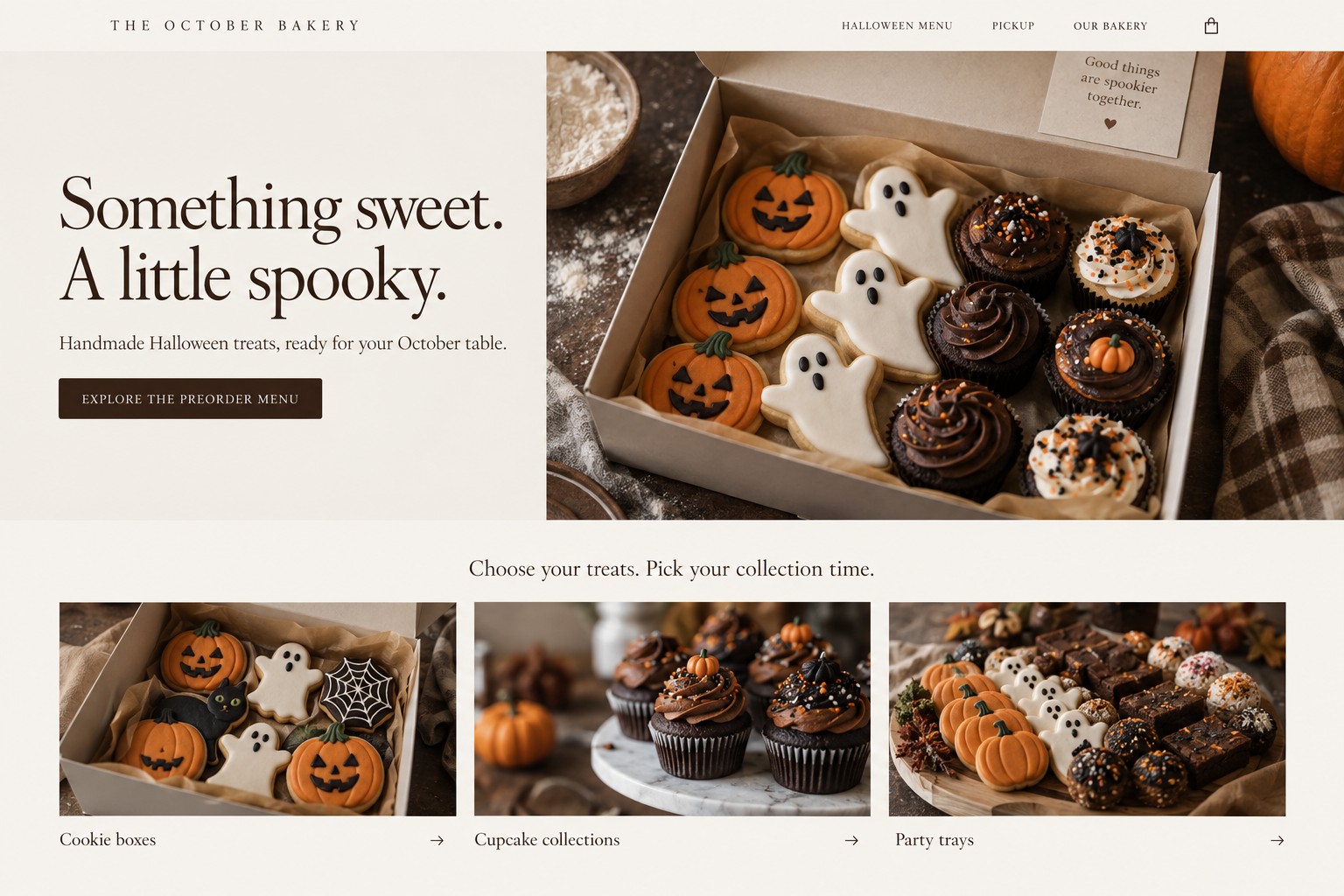
Set a limit using the tightest step in the order, then show customers what is available and when they can pick it up. For Halloween treat boxes, party trays, decorated cookies, or cupcake packs, production capacity and pickup capacity are separate constraints. An online preorder page should connect the menu to both, so each confirmed order fits the bakery’s real October schedule.
What should a bakery decide before opening Halloween orders?
Choose a short menu that the team can produce consistently, then map each item through mixing, baking, cooling, decorating, boxing, and staging. A decorated cookie set may take more hands-on time than its oven time suggests. A party tray may share components with other products, so count the ingredients and packaging against the full menu plan.
Next, set a separate limit for pickup. Decide how many orders the staff can locate and hand over in each window while answering questions and keeping walk-in service moving. If the bakery offers local pickup only, state that near the menu and at checkout. If orders are confirmed manually, make clear that a request is not yet a confirmed order.
Use actual operational details on the page: order deadline, pickup dates and windows, address or collection instructions, what each box includes, and how the customer receives confirmation. The bakery supplies accurate product, ingredient, allergen, storage, and policy information. Marketing copy should not fill gaps in those facts.
What could the preorder page say?
Keep the page focused on selecting a treat and reserving a pickup time. Here is a fictional design brief for a neighborhood bakery. The menu, dates, and wording below are examples to replace with the operator’s verified details.
Hero headline: “A little spooky, a lot of sweet. Reserve your Halloween treats.”
Supporting copy: “Choose a cookie box, cupcake set, or party tray for October pickup. Select an available date and time before checkout.”
Primary button: “See Halloween treats and pickup times”
Below the hero, show product cards with photos, item counts, prices, and verified descriptions. Follow with pickup choices, the order deadline, a short explanation of confirmation, and answers to common questions. Make unavailable pickup windows visibly unavailable. If an item sells out, remove its purchase path or mark it sold out and give customers a real alternative.
How many boxes or party trays should you offer?
Calculate what production can support, what pickup can handle, and publish the lower limit with a buffer. A preorder total that fits the oven can still overwhelm the counter if too many customers arrive in one short window.
Fictional offer and capacity example: October Bakery plans a $36 Halloween party box with 12 assorted cookies. After reserving time for everyday orders, the kitchen can safely assemble 90 boxes across three production days. The pickup counter can hand off 15 preorders per 30-minute window, and the bakery plans six windows, or 90 theoretical handoffs. The owner caps preorders at 78, leaving room for delays and order questions. At an illustrative $14 in ingredients and packaging per box, $22 remains before labor, payment fees, advertising, overhead, and profit. These figures are fictional, not a benchmark or client result. The bakery should use its own costs and observed production and handoff rates.
If one pickup window fills, the page can offer another open window. If the overall cap is reached, close orders and update every promotion that points to the page. Avoid adding a discount or accepting extra orders simply because a post is getting attention. An offer only helps when the margin and workload make sense together.
How should a bakery promote the offer?
Social posts can introduce the menu, show the actual box, explain pickup choices, and remind customers when orders close. Send every post to the preorder page, and update the link or post when availability changes. A clear “sold out” update protects customers from planning around an offer that has ended.
Google Ads may suit a bakery with an active preorder page and enough local pickup capacity. Match the ad to the item and location, set a budget the business can afford, and check whether orders are completed, not just whether people clicked. Pause or adjust ads as products or pickup windows fill. Google’s destination guidance expects ad destinations to be useful and functional, so test the page and checkout before paying to send visitors there. (Google Ads destination requirements)
AMÁRQUEZ can help shape the preorder page, connect Google Ads to the relevant offer, and plan social posts around the bakery’s real menu and availability. The right scope depends on the site, schedule, budget, and capacity. No campaign can promise a certain number of orders or a specific return.
Halloween preorder questions
Should I offer pickup on Halloween itself?
Only if the bakery will be open, staffed, and able to prepare orders for that date. Offer October pickup windows the team can support, then state the dates and hours clearly before checkout.
What if I only take orders by phone or message?
List the menu, cutoff, pickup details, and the point at which the order becomes confirmed. Tell customers what information to send and how the bakery will confirm availability. Keep a written order record so accepted orders do not exceed the planned limit.
Should I keep selling after the listed quantity sells out?
Stop accepting that item unless the bakery has verified additional production capacity. You can offer another pickup window or a different item if it is truly available. Do not leave a sold-out product purchasable while relying on a later follow-up to explain the problem.
A clear preorder page helps customers choose while giving the bakery a workable view of the day ahead. If your Halloween offer is ready but the ordering or pickup path is not, contact AMÁRQUEZ with your website, October dates, and the main obstacle. We can discuss web design, Google Ads, or social media around what your bakery can fulfill.