
Can a visitor tell which service they need?
“Accounting services” leaves a lot for the reader to work out. Someone who needs monthly bookkeeping is asking for different help from someone preparing for tax season. Name the services you offer and explain what each involves.
Give an important service enough space to answer the questions you hear before a consultation. A short menu label can take someone to the page; the page needs to explain the work.
- Who you help: name the kinds of clients you serve and the industries where you have experience.
- What you do: describe the work included and any important limits or related services.
- What you need to know: explain the questions about their current records, needs or timing that you would discuss first.
- Where meetings happen: give your real location and explain whether clients can work with you remotely.
Should you describe problems as well as services?
Yes. “Our reports arrive late” is something a business owner might say. Explain which services address problems like that and what you would need to learn about their situation before agreeing the work.
If clients can meet online, say so. If an in-person visit needs to be arranged, explain that too. Someone should know how they would work with you before sending a request.
Who will a prospective client speak to?
Name the first contact and explain who handles the work they are asking about. Team profiles should help someone understand the people behind the service, including their responsibilities and relevant experience.
Use accurate professional titles. Identify who holds each credential or membership and keep it current. A qualification held by one person should not appear to apply to the whole team.
If you have permission to show client work, describe what the client needed and what your firm delivered. Explain the source and dates behind any reported result. Keep named contacts and their contact details up to date.
How does the MBS homepage introduce its services?
The MBS homepage pictured below starts with books, taxes and reports, then offers contact and phone choices. AMÁRQUEZ delivered the complete website build for MBS Accountancy, with AI search visibility part of the brief.
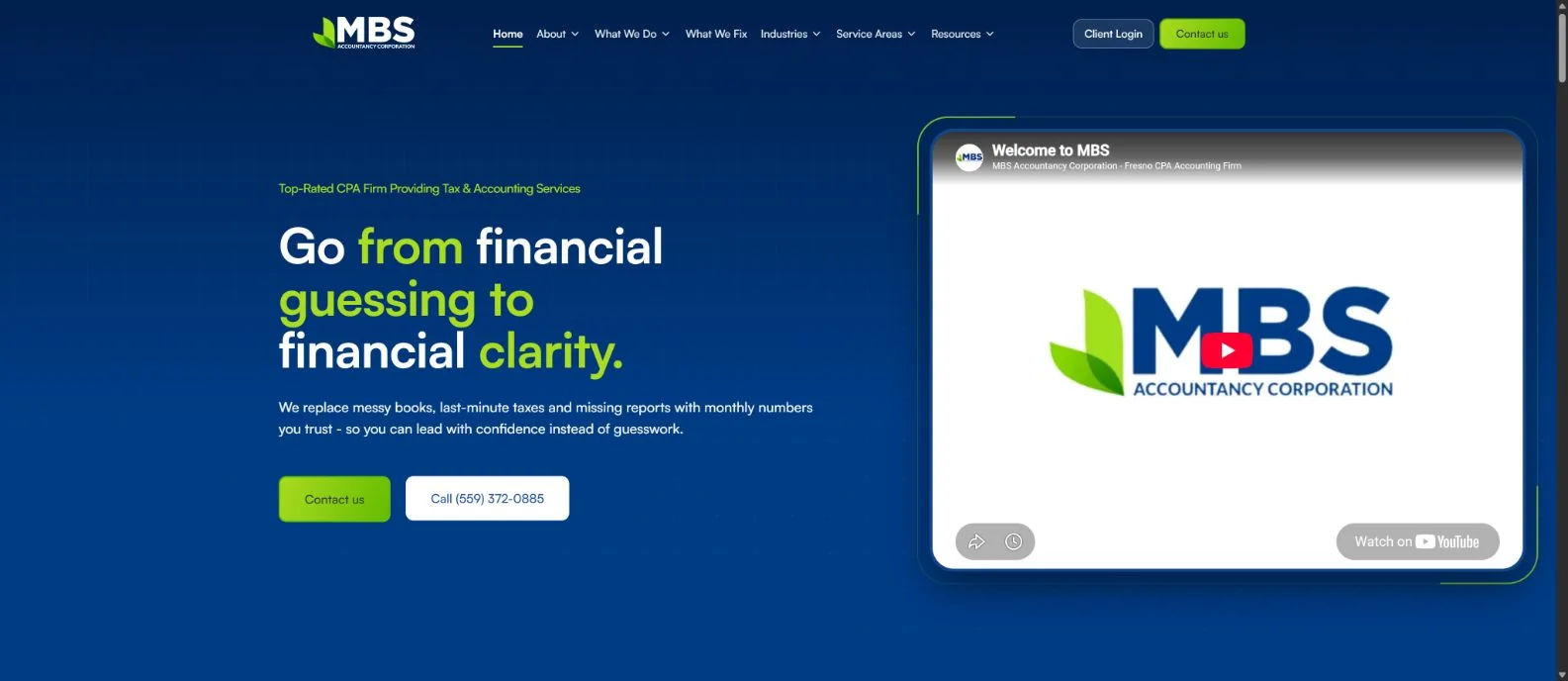
- Start with the client’s problem. The financial-clarity headline leads into a short explanation about books, taxes and reports. A reader can recognise what the firm is talking about before choosing a service.
- Keep contact in view. Contact and phone choices sit beneath the opening copy. On your own site, check that the action you want someone to take is easy to find on a phone too.
- Give existing clients their own route. The pictured navigation includes service and problem routes, with Client Login separate from Contact us. Check that each route on your site takes the right visitor to the right place.
These observations describe the pictured homepage. Use the checklist below to review the rest of your own consultation journey.
See MBS alongside other projects in our website design and build portfolio.
Is the form booking a meeting or asking for a reply?
Tell visitors what the send button actually does. If the team will reply to arrange a consultation, say that in the form and its confirmation. A request should not leave someone wondering whether they already have an appointment.
- What you will discuss: the questions the first conversation is intended to answer.
- How it happens: the meeting method, who joins and any duration or cost your firm has approved.
- How you reply: the follow-up process and whether a requested time needs confirmation.
- What to have ready: the general information that helps, with instructions for exchanging documents later.
Only promise a response time your team can maintain. Explain when a consultation leads to a proposal or agreement; sending the initial request does not itself begin an accounting engagement.
Should your website show prices?
Follow your firm’s approved pricing policy. If you prepare a quote after learning about the service, records and timing, explain what you need to know and how fees will be agreed.
What should a consultation request ask for?
An initial enquiry can ask for contact details, the help needed, the type of business or client and any deadline. Keep the questions short enough that someone can start the conversation without assembling their financial records.
| Information | Example response | Why it helps |
|---|---|---|
| Name and contact | Jamie, owner; business email and preferred contact method. | The team knows whom to contact and how. |
| Business context | A small professional-services company with an internal office manager. | It gives a starting point for assessing client fit. |
| Main need | We want to discuss ongoing bookkeeping and clearer monthly reports. | It identifies the relevant service and conversation. |
| Current arrangement | Our office manager maintains the books; an outside provider handles some year-end work. | It helps the firm understand existing responsibilities. |
| Timing | We want to discuss a possible transition next quarter. | It separates a planning conversation from an urgent request. |
| Working arrangement | Based in California and comfortable with remote meetings. | It helps clarify location and meeting needs. |
Choose the fields your team actually needs to answer the request. Mark optional questions clearly and let someone say they are unsure which service to select. Explain who will reply and what happens after they submit.
After replying, record whether the firm can help and what was agreed next. Keep consultation requests separate from people who become clients.
Where should clients send financial documents?
Tell visitors to wait for your firm’s instructions before sending tax returns, passwords or confidential financial records. Explain how you arrange a later document exchange and whom to contact if they need help.
Give existing clients a separate login or support route and check its destination. Before adding uploads or calling a portal secure, have the responsible team review the actual tools, access and document handling.
Which pages should carry these answers?
Someone arriving on a service page from Google may never visit the homepage. Put the answers beside the service they are reading about, and explain the request where they can send it.
| Page or route | Reader’s question | What to check |
|---|---|---|
| Homepage | Does this firm help someone in my situation? | A clear introduction, real client fit, priority services and a visible next step. |
| Service page | Does this service address my need? | The work, typical starting situations, scope questions and a relevant consultation link. |
| Team or About | Who would I work with? | Real people, accurate roles, relevant credentials and the delivery arrangement. |
| Relevant example | What experience supports this work? | A permitted example with accurate scope and evidence for any outcome claim. |
| Consultation request | What am I requesting and what happens next? | A brief explanation, purposeful fields, clear confirmation and a working follow-up route. |
| Existing-client route | How do I continue working with the firm? | A distinct login or support link and instructions that match the actual process. |
Keep service names and contact instructions consistent across the site. Check that the service page, form and confirmation describe the same request.
Can someone unfamiliar with your firm use the site?
Ask someone who does not know the website to try a few tasks on a phone. Give them a reason to contact the firm and watch where they hesitate or need an explanation.
- Find the service. Can they find the help for the need you described and explain what they think it includes?
- Find the people. Can they tell who they would contact and what experience supports the work?
- Understand the request. Ask what they expect after sending it. Compare their answer with what your team actually does.
- Check delivery. Use your firm’s agreed form-test process to confirm that a request reaches the person responsible. Check the confirmation, phone link and existing-client route too.
If the services are clear but the form leaves people wondering what happens next, start with the form wording. If they cannot distinguish ongoing bookkeeping from one-off work, start with the service descriptions.
For each problem, record the page, what confused the reader, the proposed change and who will check it. Our guide to planning improvements before a new website helps turn those observations into a brief.