
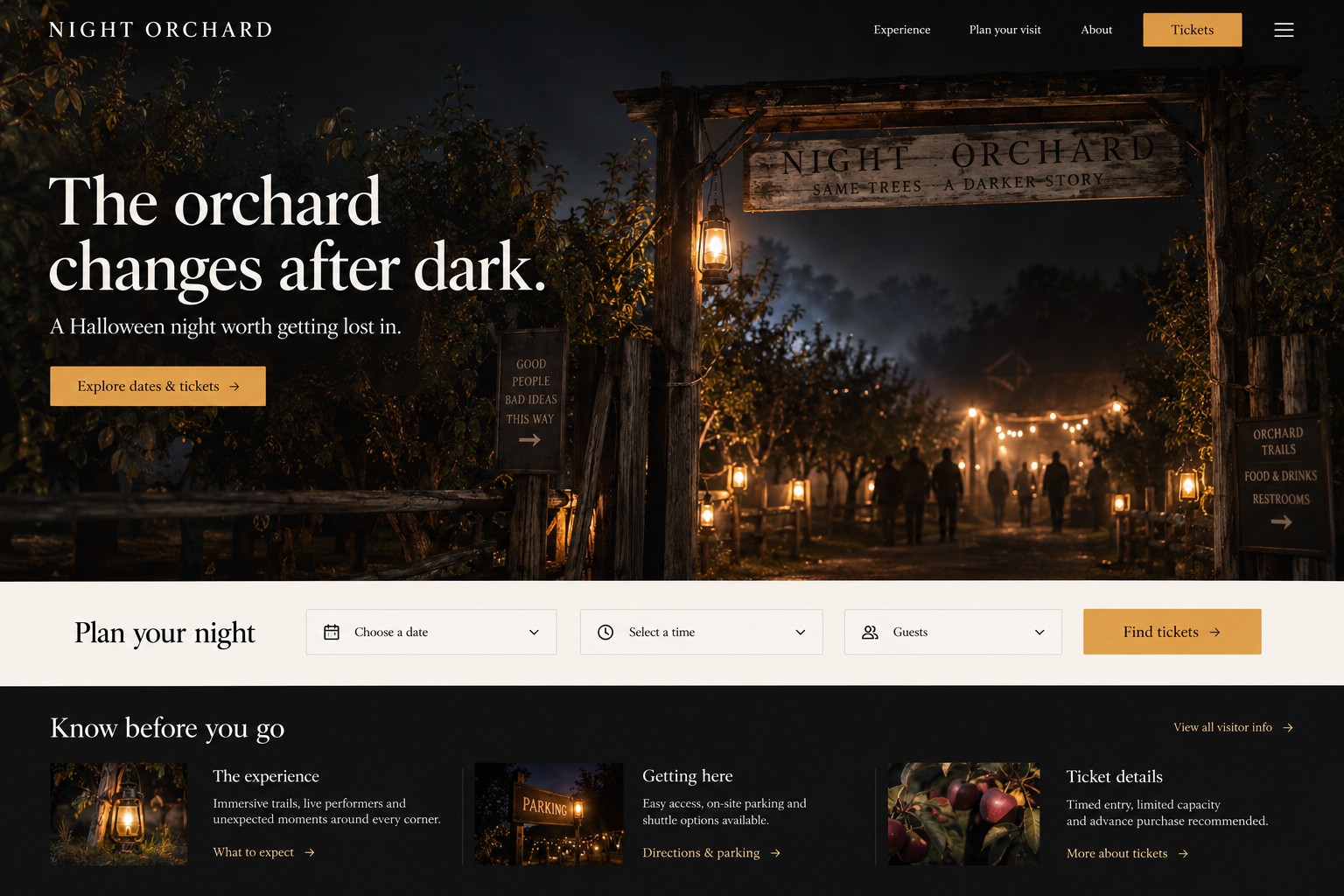
Before increasing Halloween ad spend, make the mobile ticket page answer the questions that stop a guest from booking: what the event is, which dates and times remain, what the ticket costs, where to go, and what happens after purchase. Then complete a test booking on a phone. Ads can bring a visitor to the page, but they cannot repair a confusing or broken route to a ticket.
The National Retail Federation’s 2026 Halloween survey estimates $13.5 billion in holiday spending and reports that 49% plan to begin shopping in September or earlier. Those broad consumer figures provide seasonal context, not a forecast for one attraction’s tickets. Use your own availability, customer questions, and completed bookings to guide the next change.
What should a guest understand before choosing a date?
Put the essential decision details near the top: event name and experience, venue address or region, operating dates, age or access guidance supplied by the operator, starting and total price, and a clear path to available times. Use the same offer language in the ad and on the page. Google describes landing-page experience in terms that include useful, relevant information, easy navigation, and matching what people expect after clicking an ad.
Avoid making visitors infer whether a ticket covers parking, a timed entry, a particular attraction, or a group. State what is included and identify optional extras. Show the total ticket price and applicable charges clearly before a guest pays. Clear price presentation helps every buyer understand the offer.
Can a visitor finish the booking on a phone?
Test the whole route on a real phone, from the ad or landing page through confirmation. Check that the selected date and time carry into checkout, ticket quantities are easy to change, required fields are labeled, errors explain how to recover, and the confirmation states the event, date, time, venue, and next steps. Test a sold-out date, a payment decline, and a return from the ticket vendor. If checkout opens a partner site, clearly explain that handoff and make sure the chosen session does not disappear.
Give the main button a specific label such as “Choose a date and time.” Make it easy to tap and keep it visible when practical, without covering content or creating an obstructive pop-up. Include accessible alternatives to color-only availability cues and provide readable labels for controls. Ask the ticket platform or developer to confirm which changes its checkout supports.
Illustrative page brief: fictional “Night Orchard”
This example is entirely fictional. It illustrates hierarchy only; it makes no claim about a real event, actual inventory, price, or result.
Hero copy: “Night Orchard: a lantern-lit Halloween trail” followed by “Choose your date, see live entry times, and book tickets online.” A primary button reads “Check dates and tickets.” Beneath it: “At [operator-provided venue address] · [operator-provided event dates] · [operator-approved age/access note].”
Mobile layout: Start with one atmospheric image and descriptive alt text. Follow with the date selector and a list of available times showing the current ticket total and what the ticket includes. Put location, parking, accessibility, age, weather, and cancellation information in short labeled sections. Place FAQs before checkout, then repeat the booking action. At checkout, display the selected session, total ticket price, and applicable charges before payment. Only publish details the operator has verified.
Recovery states: When a session sells out, keep the visitor’s place and show the next available time. If a price or date changes, explain the change before payment. If checkout fails, explain whether the session is still held and give a clear retry path. Never imply a session is reserved unless the ticket system confirms it, and never show a stale “available” state as if it were live inventory.
What should you record in a mobile booking test?
Record the device, ticket choice, expected price and confirmation before testing. Then write down what actually happened and who will resolve any issue. Use the same record for a normal booking, a sold-out session, a payment decline and a return from a partner checkout. This gives the operator and developer a specific problem to reproduce.
Mobile booking test sheet
Copy this blank record into your notes and fill it in for each test. Use a ticket-provider-approved test mode or a transaction the operator has authorised.
- Device and browser
- [Phone model, browser and version]
- Selected session
- [Event date, entry time, ticket types and quantities]
- Expected total price
- [Ticket total, currency and all applicable fees]
- Expected confirmation
- [Event, session, quantity, venue and instructions the guest should receive]
- Recovery or failure case
- [Normal booking, sold-out session, approved payment-decline test or partner-checkout return; expected recovery]
- Observed result
- [What happened, whether it matched the expectation, and a screenshot or error reference if useful]
- Owner and next step
- [Person responsible, change needed and date to repeat the test]
Filled example: an illustrative Night Orchard test plan
This is a fictional plan, not a completed test or a client result. The session, price and venue are invented for the example; replace them with operator-approved details.
- Device and browser
- iPhone with Safari; the tester will record the exact versions.
- Selected session
- Night Orchard, October 24, 2026 at 7 pm; two adult tickets.
- Expected total price
- $40 USD including all fees, shown before payment. This is an illustrative price.
- Expected confirmation
- Two adult tickets, October 24 at 7 pm, the Night Orchard venue address and entry instructions.
- Recovery or failure case
- A simulated payment decline in the provider’s approved test mode. Expect a clear retry path and an accurate explanation of whether the selected session is still held.
- Observed result
- Not run. The tester must record the actual message, session state and order status before marking this test complete.
- Owner and next step
- The event booking manager records any issue, assigns the correction and repeats the test before increasing ad spend.
Keep a failed test open until the correction has been checked on the same device and browser. Verify the order status in the ticketing system before retrying a payment so a guest is not encouraged to create a duplicate order.
What should you check before increasing ad spend?
Start with one test purchase or an operator-approved test transaction. Confirm that a completed order appears in the ticketing system and that campaign reporting records the right purchase action and value, subject to the platform’s capabilities and privacy setup. Google Ads supports separate conversion actions for purchases and other website actions. Keep ticket purchases distinct from checkout starts, button clicks, refunds, and attended visits. A click or checkout start is not a paid ticket, and a paid ticket is not proof of attendance.
For Google Ads, use ad groups and landing pages that match the actual experience and dates being promoted. Check search terms, location targeting, final URLs, mobile behavior, and remaining inventory before raising budgets. Google says ad relevance and landing-page usefulness contribute to its assessment of landing-page experience; this is a quality guidance point, not a promise of lower costs or more bookings. For social media, use short, truthful previews of the experience, answer recurring practical questions in captions, and link directly to the matching date or ticket page. Keep creative current when dates sell out or operating details change.
How can AMÁRQUEZ help with a ticket-page campaign?
AMÁRQUEZ can help plan and build a page around the guest’s path from discovery to booking, then connect that experience to Google Ads or social media promotion. Share your website, campaign date, ticket platform, and the part of checkout that is creating friction. Start with web design, review Google Ads, or contact AMÁRQUEZ with the specifics. Any event policies, available sessions, prices, and platform constraints need to be supplied and approved by the operator.
Halloween ticket-page FAQs
Should I buy more ads if the ticket page is confusing?
Fix and test the booking route first. More visits do not resolve unclear dates, missing price information, a broken checkout handoff, or stale availability.
What should appear beside a Halloween ticket price?
Show what the ticket includes, the selected date and time, the total ticket price and applicable charges, and any important operator-approved restrictions or policies.
Which ticket result should I measure?
Measure completed paid orders separately from clicks, checkout starts, cancellations, refunds, and visits. Confirm what the ticket provider and analytics setup can reliably report before optimizing ads to it.