
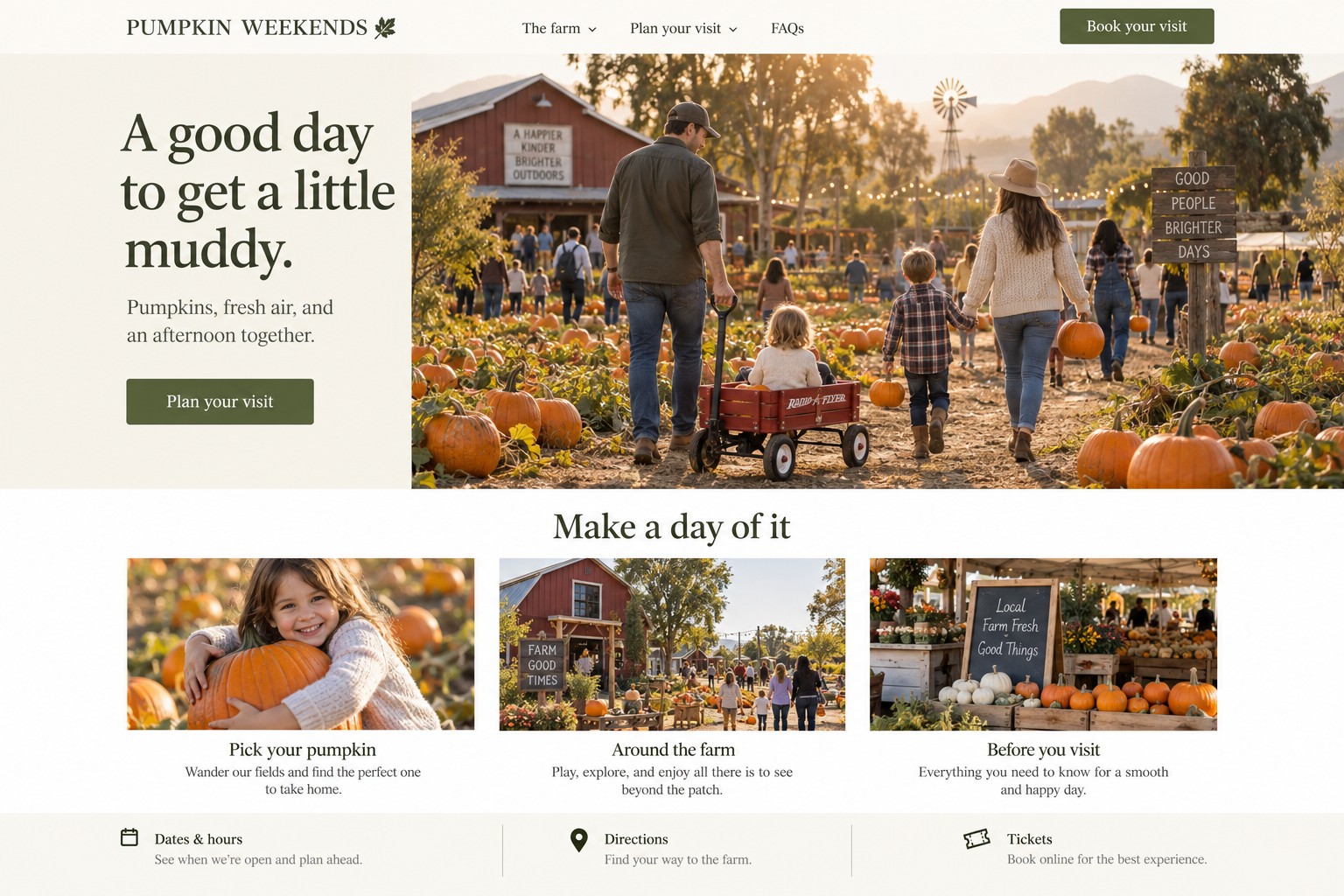
A Halloween family-event page should put dates, hours, location, admission details, directions, facilities, event rules, and organizer-confirmed access information in one reliable place. Families use these details to decide whether and how to visit.
Which visitor details belong near the top of the page?
Lead with the event name, dates, open hours, city or venue, admission basics, and a clear way to plan the visit. Visitors should not need to scroll through promotional copy to find the address or discover that an activity is unsuitable for their child.
Hypothetical hero copy:
PUMPKIN WEEKENDS in the Fresno area
Visit [venue and city] on [verified dates]. Review hours, directions, facilities, and access information, then see what the family admission bundle includes.
[View visit details and family tickets]
Answer practical questions in order: when the event runs, how to get there, what is included, what to bring, what facilities are available, and whom to contact. Keep parking details specific and describe alternatives only when confirmed. Verify route, quiet-space, and facility details with the operator.
How can an event page make access information easier to find?
Use a clearly labeled “Access and facilities” section with concrete descriptions and a contact route for questions. The National Park Service's visitor-planning guidance encourages visitors with disability-related questions to contact the park ahead of time. Event organizers can follow that practical pattern: publish confirmed details and give visitors a way to ask about their needs.
Ask the operator to verify each statement before it appears. Relevant details may include the route from parking to the entrance, surface type, stairs or ramps, restroom location, seating, lighting, noise levels, flashing effects, food information, service-animal policy, and re-entry. Include what matters for this event, describe it plainly, and direct visitors to a staff contact for questions.
Digital presentation matters too. Use descriptive headings, readable text, useful image alternatives, adequate contrast, and keyboard-operable buttons. W3C's WCAG 2.2 guidance covers practices such as text alternatives, contrast, keyboard access, and reflow.
How should web design and promotion work together?
Treat the visitor-information page as the source of truth, then link it from the event's main site, Google Business Profile, community calendars, email, and social posts. Pair the guide with a straightforward family offer, such as a bundle that clearly lists the adult and child admissions included and the total price. Show the same bundle terms on the landing page, in ads, and at checkout. A “Get family tickets” button should lead to the operator's current purchase page, where families can complete the booking. Use paid local ads when the audience, event details, and budget are clear. Social posts can spotlight one practical detail and link to the guide.
Design for mobile use. Keep the address, hours, and contact action in readable text, not only inside a flyer image. If dates, weather plans, or venue details change, update the page first and point every campaign to that current version. Ad creative can rotate among three useful messages: “Plan your family visit,” “See what is included in the family bundle,” and “Check directions and event details.” Each should land on the matching section or purchase action, not a generic home page.
Assign a staff contact to check hours, weather, entrances, and facilities. Date the page only after review, and update it before ads if details change. Use plain directions that describe confirmed routes and surfaces, and offer a monitored contact for questions.
Hypothetical page sections:
- Hero with event name, date range, venue/city, and “Plan your visit.”
- Hours and event overview, with admission information supplied by the operator.
- Directions, parking/transit, entrance location, and weather plan if confirmed.
- Facilities and access notes, including known sensory details and a contact for questions.
- What to bring, event rules, and frequently asked questions.
What might a family-event example look like?
Imagine a fictional Central Valley event called PUMPKIN WEEKENDS, serving families from Fresno and nearby communities. The organizer confirms its dates, admission prices, route surface, restroom location, parking directions, and event activities. These details are invented for illustration and would need direct confirmation before publication. It offers an optional family bundle with the included admissions and total price stated clearly.
The landing page would put directions and visitor information before the purchase button, then describe exactly what the family bundle includes and send buyers to the event's checkout page. An ad might show an operator-approved photo of the event and say, “Plan a fall visit with the family. See dates, directions, event details, and bundle admission.” Campaign reporting would compare completed family-bundle orders or group purchases with ad spend, while tracking clicks and calls as diagnostic signals. If the operator changes dates or reaches capacity, the page and ads are updated or paused. This is a fictional plan, not a local client result.
How can AMÁRQUEZ help an event operator?
AMÁRQUEZ can organize visitor questions into a clear landing page, improve local search information, prepare paid search and social campaigns, and make the page easier to use on mobile. The operator supplies and approves dates, directions, facilities, event rules, access details, and contact methods. Campaign reporting can connect ad clicks and landing-page activity with completed purchases or group bookings when the checkout system provides that data.
If you run a seasonal event and want its visitor information page and promotion improved, contact AMÁRQUEZ about web design to discuss your event and goals.
What should event organizers know about visitor information pages?
Should access details be on a separate page?
Keep key access facts visible on the main visitor page. A separate detailed access page can help when there is a lot to explain, but link to it clearly and repeat the most important planning details.
What if the organizer does not know a visitor detail?
Do not guess. Ask the person responsible for the venue, publish what is confirmed, and give visitors a way to ask about details that are still being checked.