
A Cyber Monday landing page works when the product promised in an ad is easy to find, understand, and buy on the device the shopper uses. Connect the ad to the right product or offer page, show price and fulfillment terms before checkout, and test every step. In 2026, Cyber Monday is November 30.
What should a shopper see after clicking a Cyber Monday ad?
The first screen should confirm the product or collection, the promotion, and the next useful action. Do not send every campaign to the generic homepage and make visitors search for the item mentioned in the ad. A product ad should lead to that product with the correct variant selected where possible. A category offer can lead to a collection that displays eligible items and exclusions.
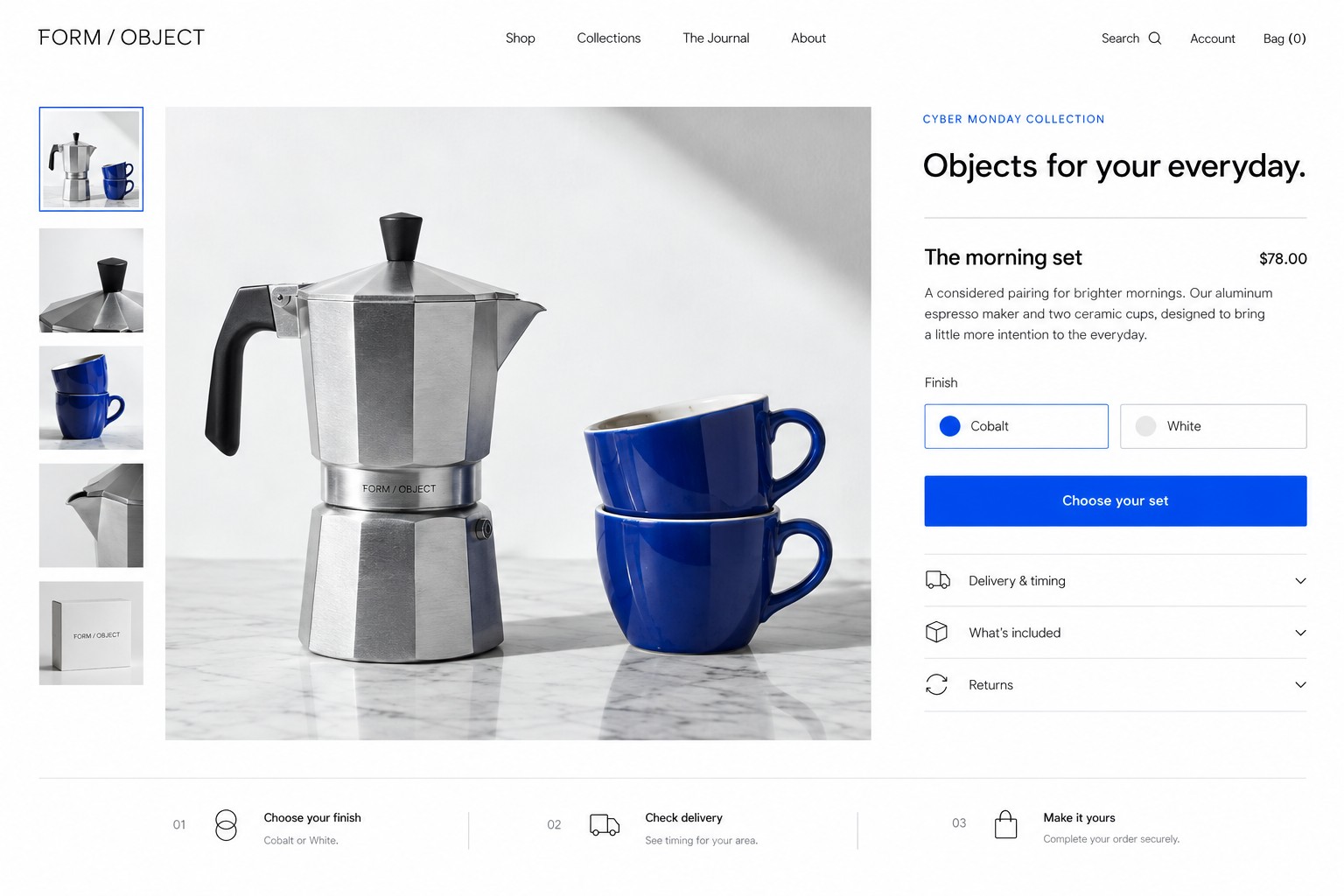
For fictional store FORM / OBJECT, an ad for a coffee maker and cobalt cups set should open a page featuring that set, qualifying price, dimensions, materials, stock status, and delivery information. If the offer needs a code, show where to enter it and whether the displayed price already includes the discount. Label the button with a clear action such as “Choose finish” or “Add to bag.”
How should the page connect product details to checkout?
Make the path easy to follow: ad, product page, selected variant, cart, checkout, order confirmation. At each step, preserve the item, quantity, price, and promotion. The product page should answer questions that affect a purchase: size, material, compatibility, what is included, shipping or pickup choices, return terms, and when the item is expected to ship. Use current product images and stock information.
In the cart, show line items, discounts, known shipping or other charges, and the order total before the customer commits. In checkout, request only information needed to fulfill the order, explain errors beside the relevant field, and keep support and policy links accessible. Test mobile keyboard behavior, address entry, payment failure messages, and the confirmation page. A successful order should not depend on a shopper guessing whether a tap worked.
What is a fictional example of order economics?
Fictional example: FORM / OBJECT lists a coffee maker and cups set for $90, with a $38 product cost. Assume $6 for packaging and payment costs and a $10 shipping subsidy. That leaves $36 before advertising, labor, overhead, and profit. A Cyber Monday price of $78 leaves $24 on the same assumptions. If the store allocates an illustrative $7 to acquire an order, $17 remains before those other costs. This arithmetic uses invented figures, not a forecast or market benchmark. Replace the inputs with current supplier, platform, shipping, and advertising costs.
Run the calculation for bundles and discount codes too. A larger basket can still have lower contribution if extra shipping, discounts, or product costs grow faster than revenue. Set a stop condition for low stock and keep offer terms consistent between ad, page, cart, and checkout.
How do you make the page useful for search and ads?
Use a specific page title and visible product information that matches the item. Google documents product structured data and merchant listings for purchasable product pages, including information such as price, availability, shipping, and returns. Structured data can help Google understand a page, but eligibility does not guarantee a particular search appearance. Keep markup synchronized with visible, current product facts. (Google product structured data guidance)
For paid search, make the final URL lead to the advertised content and verify it loads and works on common devices. Google describes landing page experience through relevance, usefulness, navigation, and whether the page meets the expectation set by the ad. (Google Ads landing page guidance)
A social ad example for the fictional shop: “A better start to the morning. The FORM / OBJECT coffee maker and cups set is $78 on Cyber Monday. See dimensions, finish, delivery details, and current stock.” Use price and stock wording only when the live page supports it. Keep promotional terms near the offer and ensure the destination displays the same terms.
What should you test before sending traffic?
Test the complete path on a phone and desktop. Confirm ad links point to the intended page, variants stay selected, the code works as described, shipping and tax calculations behave as configured, and an order confirmation appears. Check the inventory process that marks items unavailable and assign someone to monitor it on the promotion date.
AMÁRQUEZ can map the product-to-checkout experience through web design, align search ads to their destinations with Google Ads, and prepare social posts that send people to the right page through social media. Scope depends on the platform, assets, products, and timeline.
Record the tested steps and the time of the check so another staff member can repeat it if a setting changes. If the payment provider or shipping rules are updated, repeat the affected checkout steps before the promotion resumes.
Where can you get help with the Cyber Monday page?
Share the product, offer rules, inventory process, shipping or pickup details, platform, and target date when contacting AMÁRQUEZ. To improve the shopping path, start at web design contact. For a Black Friday offer strategy, read Black Friday retail advertising; for local visits, read Small Business Saturday marketing. The holiday advertising budget guide can help plan spend around capacity.